
Scale GUI Agents with Workspot DaaS
GUIDE is the AI-native GUI agent platform that makes it easy for organizations to harness the power of AI – right now – to automate and streamline a multitude of common workflows to save significant time, money, and resources. With the flexibility to use AI services and foundational models of choice, and by using natural language prompts to build out accurate, cost-effective, and secure automated workflows via GUIDE’s unique built-test-observe process, engineers and non-coders alike can automate business processes in a small fraction of the time (minutes instead of months) required using traditional methods like RPA, for example.
Given the time-saving and practicality advantages of GUIDE, one may ask how to scale this AI-fueled GUI automated workflow process across an enterprise that may need to have GUIDE GUI agents running on hundreds or thousands of desktops. The answer is desktop as a service (DaaS) – namely, Workspot DaaS. With Workspot DaaS, the power of GUIDE is easily extended across any enterprise and to users with virtual desktops located anywhere around the globe.
GUIDE integrated with Workspot DaaS includes multiple capabilities and advantages that enable easy and extensive reach of virtual desktops from which GUIDE can automate AI-native workflows. Namely,
Workspot Control, a key part of Workspot DaaS, already manages thousands of cloud desktops for global enterprises across AWS, Google Cloud, Azure, and Akamai.
Workspot Control manages the integration with enterprise directory structures like Active Directory and Azure Active Directory.
With one-click tenant pairing, the moment a customer connects their Workspot Control tenant with GUIDE, every synced user, group, and desktop pool becomes an addressable runtime for agents
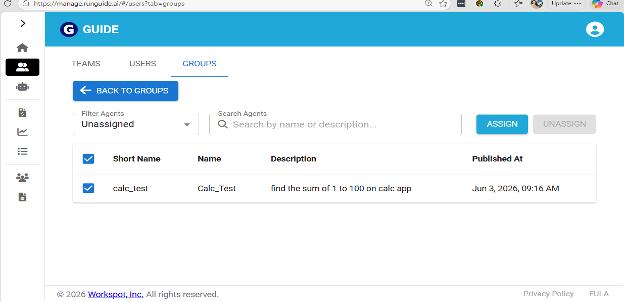
A new GUIDE GUI agent can be rolled out to an enterprise directory group with one bulk assign, and every group member gets it automatically.
The GUIDE-Workspot DaaS integration turns "who can run this agent and where?" from a configuration challenge into a property of the enterprise directory the customer already maintains.
Users can run GUIDE GUI agents on VMs assigned to them using the same Group Membership construct in Workspot Control.
GUIDE GUI agents can run on AWS, Google Cloud, Azure, or Akamai — wherever the customer's data and apps already live. This flexibility helps prohibit vendor lock-in inherited from the agent platform.
Let’s take a look at the Workspot DaaS-GUIDE integration workflow:
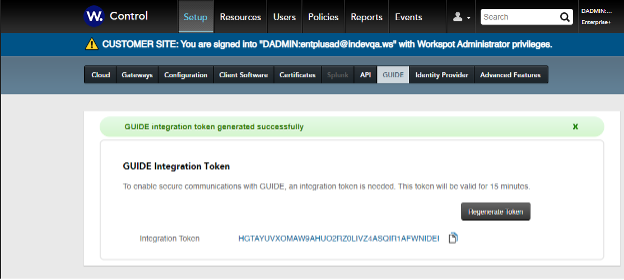
1. An admin creates an integration token from Workspot Control.
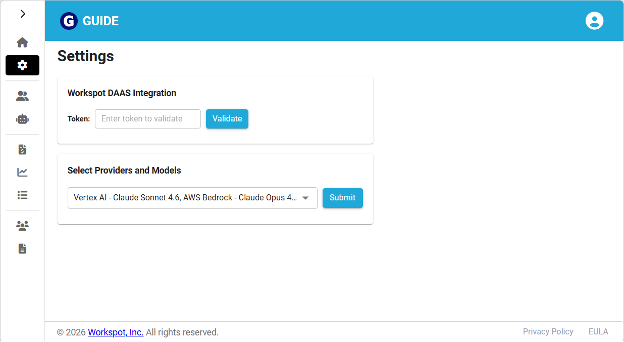
2. In GUIDE, enter the DaaS integration token.
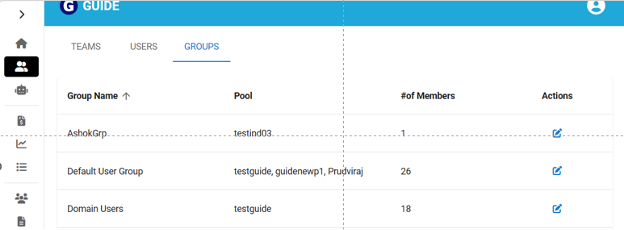
3. Users and groups are then synched from Workspot Control.
4. Group-based GUIDE GUI agents then get assigned.
The integration of GUIDE with Workspot Daas allows organizations to create and invoke automated AI-powered workflows from virtual desktops literally anywhere on the planet, in just a few easy steps. For those who have viewed AI with trepidation or as more of an abstract, esoteric trending technology, GUIDE integrated with Workspot DaaS represents a new, practical, and pragmatic way to use the power of AI to vastly improve common enterprise workflows anywhere – today. If you’re looking to use AI to improve your business, consider GUIDE, and the GUIDE-Workspot DaaS integration extends that benefit to your people located anywhere.
